

Elgato Facecam 4k
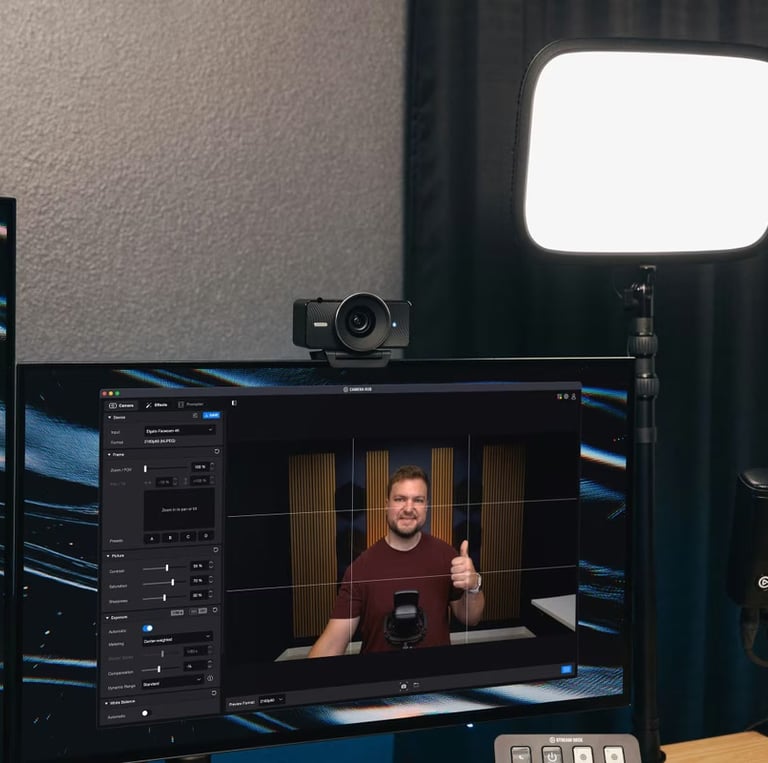
Elgato Facecam 4K is built for creators who want a sharp, polished look every time they go live. Dial in a consistent image fast and keep your workflow simple.
Rated 5 stars
★★★★★
Why Creators Choose
Creators choose the Elgato Facecam 4K because it’s built to deliver a clean, studio-ready look with a workflow that stays simple. It’s a strong pick when you want your camera to “just work” every time you go live—sharp image, smooth motion, and the ability to dial in a consistent look so your stream doesn’t change from day to day. If you’re serious about looking professional on camera without the cost and complexity of a full camera rig, Facecam 4K is an easy upgrade that pays off immediately.
150+
Fan-favorite
Key Benefits
Crisp, professional on-air image that instantly upgrades your stream and recordings
Smooth motion for live content so your video looks clean and confident while you talk
Reliable focus for talking-head shots so you stay sharp without constant fiddling
Consistent look every session so your camera doesn’t change from stream to stream
Creator-friendly controls that make it easy to dial in your best look fast
Best For
Not For
Streamers who want a clean, studio-ready look with minimal hassle
YouTubers recording talking-head videos, tutorials, and reviews
Remote presenters who want to look sharp and professional on calls
Creators who value a consistent look every time they go live
Anyone upgrading from a basic webcam without jumping to a full camera rig
Creators who want interchangeable lenses and a full “cinema camera” workflow
People who need long-range zoom or highly specialized shooting setups
Users who don’t want to do any basic setup/tuning for their camera image
Mobile-only creators who need a camera that works without a computer
Anyone who expects the webcam mic to replace a dedicated microphone

Setup Tips for a Pro On-Air Look
Set it at eye level — place the camera so the lens is even with your eyes for a natural, confident look.
Frame head + shoulders — leave a little space above your head and keep your eyes near the top third of the frame.
Use soft front lighting — a key light slightly above eye level (45° angle) gives the cleanest “studio” look.
Separate from the background — add a small lamp or backlight behind you so you don’t blend into the wall.
Lock in consistency — once it looks good, keep the same camera position, lighting, and settings so every stream matches.

Elgato Facecam 4K FAQ
Who is Elgato Facecam 4K best for?
Creators who want a clean, studio-ready look for streaming, calls, and talking-head videos without the complexity of a full camera rig.
How do I get the best image quality fast?
Put the camera at eye level, use soft front lighting, and keep your framing consistent (head and shoulders, eyes near the top third).
Is it good for live streaming and video calls?
Yes—it's designed for on-camera clarity and consistency, which is exactly what streamers and remote presenters need.
How do I reduce glare or reflections?
Avoid aiming lights directly at the camera, raise your key light slightly above eye level, and soften the light with diffusion.
Do I need special software to use it?
It will work as a webcam, but using the companion controls (where available) makes it easier to dial in a consistent, professional look.
What should I pair it with for the biggest upgrade?
A dedicated microphone and a simple key light—audio and lighting will make your stream feel dramatically more professional.

Should you get Facecam 4K?
If you want a clean, studio-ready look with a simple workflow, Facecam 4K is an easy upgrade that makes your streams and videos feel instantly more professional. Set it up once, lock in your look, and show up on camera with confidence every time.
Rated 5 stars
★★★★★
Contact
Questions or gear tips? Reach out anytime.
Phone
Joe@gearforgoinglive.com
As an Amazon Associate, Gear For Going Live earns from qualifying purchases. Some links on this site are affiliate links — we may earn a commission at no extra cost to you. © 2025 Gear For Going Live. All rights reserved.